MLB The Show Pitch Recognition & PCI Timing Reference
Recognize pitch families, set PCI depth by pitch type, adjust for count and latency, and tune swing timing for ranked and Battle Royale.
Introduction
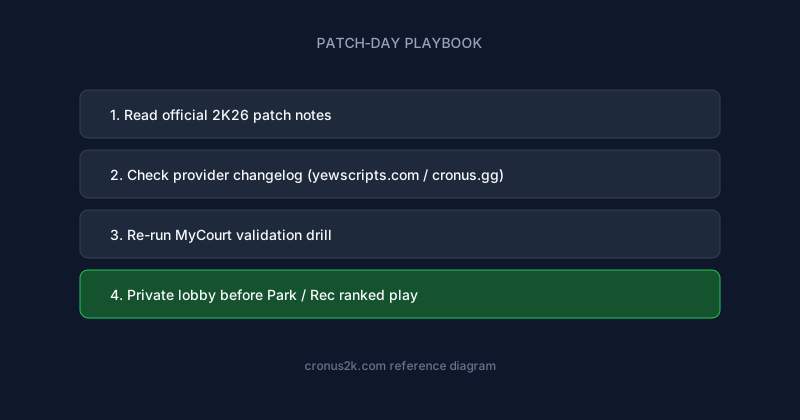
For maintained NBA 2K26 GPC libraries with patch-day changelogs, compare YewScripts and creator listings on Cronus.gg. Plug-and-play Hoops lives on yew.gg/hoops; broader tooling and docs are on yew.gg.
Batting in MLB The Show 26 is a timing and recognition problem disguised as a reflex test. Before your swing timing matters, you must identify what is coming out of the pitcher's hand, estimate where it will cross the plate, and position the Plate Coverage Indicator accordingly. Cronus Zen scripts for baseball assist the final step — swing input timing and PCI anchoring — but they cannot read pitch type from game memory or predict a slider's break before release.
Understanding pitch recognition fundamentals, PCI depth mechanics, and online latency behavior separates players who tune scripts effectively from those who enable maximum swing assist and wonder why they chase sliders in the dirt against human opponents.
This guide is a technical deep dive into pitch-type recognition, PCI depth strategy, timing assist calibration, and online latency compensation for The Show 26. It assumes Cronus Zen hardware literacy from the beginner's reference and script installation from the MLB The Show setup guide. For provider evaluation before purchase, apply the framework in How to choose a sports-game Cronus script.
How pitch recognition works in The Show 26
The Show does not display pitch type labels until after contact or take. You must infer pitch identity from visual cues available during the pitcher's windup and release. The game models realistic pitch physics — velocity, spin axis, break rate, and release point — so recognition skills transfer from real baseball concepts, though animation timing differs from broadcast footage.
Primary recognition cues
| Cue | What to observe | Reliability |
|---|---|---|
| Release point height | Over-the-top vs three-quarter vs submarine arm slots | High for distinguishing fastball families from breaking balls |
| Initial velocity | Apparent speed leaving the hand | High for fastball vs changeup differentiation |
| Spin axis / rotation | Seam visibility and ball rotation direction | Moderate; harder at broadcast camera angles |
| Pitcher tendency | Count, situation, and opponent history | High in repeated matchups; moderate in Battle Royale |
| Arm speed consistency | Whether arm speed matches pitch type | High for changeup detection against hard-throwing starters |
Recognition is a layered process. Elite players commit to pitch family — hard, breaking, or off-speed — before release, then refine location and depth during ball flight. Casual players react after the ball is halfway to the plate, which is too late against high-velocity fastballs and well-located breaking balls online.
The recognition-to-swing pipeline
- Pre-pitch read: Assess count, base situation, pitcher archetype, and previous pitch sequence.
- Release identification: Determine pitch family from arm slot, arm speed, and initial trajectory.
- PCI positioning: Anchor the indicator depth and horizontal location based on pitch family prediction.
- Swing decision: Commit or take based on location relative to the strike zone.
- Timing execution: Press swing at the correct moment relative to plate arrival.
Cronus scripts primarily assist step five — and partially step three if PCI anchoring mods are enabled. Steps one through four remain player skills. Scripts that advertise automatic perfect contact on every pitch misrepresent this pipeline.
Note: CPU opponents follow predictable patterns that inflate offline recognition statistics. Human opponents mix pitch sequences, delay delivery timing, and exploit PCI habits. Validate recognition-tuned settings online, not only in offline franchise.
Pitch type reference and PCI implications
Each pitch family demands different PCI depth, swing timing, and script profile behavior. Treating all pitches with identical indicator positioning produces chases below the zone and late swings on elevated fastballs.
Four-seam and sinker fastballs
Fastballs arrive with the highest velocity and least horizontal break. PCI depth typically sits forward — closer to the front of the zone — because contact must occur early to drive the ball. Sinkers and two-seam variants drop late; depth may sit slightly deeper than four-seam to account for downward run.
| Fastball variant | PCI depth tendency | Timing assist implication |
|---|---|---|
| Four-seam high velocity | Forward third of zone | Shorter swing delay; early commit |
| Two-seam / sinker | Slightly deeper than four-seam | Moderate delay; account for drop |
| Cutter | Forward; slight horizontal read | Similar to four-seam with inside run awareness |
Script timing profiles for fastball-heavy counts should prioritize early swing windows. Fixed-delay macros tuned on breaking balls will produce late swings on 98 mph inside fastballs.
Sliders and sweepers
Sliders break horizontally and downward late in flight. PCI depth sits deeper than fastball depth — back third of the zone — because contact occurs later as you track break into the zone. Sweepers extend horizontal break further; recognition requires identifying lateral movement early.
Common failure mode: anchoring PCI at fastball depth and swinging over the top of a slider that breaks below the indicator. Timing assist cannot fix incorrect PCI depth; it only executes swing input once you commit.
| Slider type | Recognition cue | PCI adjustment |
|---|---|---|
| Traditional slider | Late horizontal drop; tight spin | Deep anchor; wait for break |
| Sweeper | Wide horizontal break; slower velocity | Deep anchor; horizontal pre-position |
| Slurve (slider/curve hybrid) | Diagonal break; slower than slider | Deepest breaking-ball depth |
Curveballs and knuckle curves
Curveballs loop vertically with slower velocity than sliders. PCI depth is typically the deepest among common pitch types. Players who sit forward on curveballs produce weak contact or swings and misses above the ball.
Recognition depends on identifying the hump in trajectory — the ball climbing before dropping. Arm speed on curveballs often appears slower than fastball arm speed from the same pitcher, a key tell in mixed-arsenal matchups.
Changeups and splitters
Changeups rely on arm speed deception — identical arm action to fastball with reduced velocity. Recognition requires comparing apparent arm speed to ball velocity immediately after release. PCI depth sits deeper than fastball, shallower than breaking ball depending on changeup type.
Splitters drop sharply like a hard sinker. PCI depth varies by pitcher; some splitters behave like vertical breaking balls requiring deep anchors.
| Off-speed type | Primary tell | PCI depth |
|---|---|---|
| Circle change | Reduced velocity; similar arm path | Moderate depth |
| Palmball | Visible grip; slower arm | Moderate to deep |
| Splitter | Sharp downward drop at plate | Deep; similar to sinker |
Pitch type summary table
| Pitch family | Velocity | Break timing | PCI depth | Swing timing |
|---|---|---|---|---|
| Four-seam | Highest | Minimal | Forward | Early |
| Sinker / two-seam | High | Late vertical | Forward-moderate | Early-moderate |
| Slider / sweeper | Moderate | Late horizontal | Deep | Late |
| Curveball | Low-moderate | Early vertical hump | Deepest | Late |
| Changeup | Low (deceptive) | Minimal to moderate | Moderate | Moderate |
| Splitter | Moderate | Late sharp drop | Deep | Late |
PCI depth mechanics and script interaction
The Plate Coverage Indicator represents the area your batter can cover with the swing. PCI depth — controlled by right stick forward and back on default controls — determines whether you are positioned for early-contact fastballs or late-contact breaking balls.
Depth zones explained
Think of PCI depth in three zones relative to the strike zone:
- Forward zone: Contact on pitches arriving early in the hitting plane; optimal for fastballs and elevated pitches.
- Middle zone: Balanced position for mixed-count hitting; compromise profile for two-strike approaches.
- Deep zone: Contact on late-breaking pitches; optimal for sliders, curves, and changeups read correctly.
Scripts with PCI anchoring mods assist stick positioning — automatically holding or nudging depth toward configured values when you initiate swing. Quality varies: some scripts anchor depth per pitch-type profile toggled by button combination; others apply a single depth bias regardless of count.
When PCI assist helps vs hurts
| Scenario | PCI assist value | Risk |
|---|---|---|
| Fastball-heavy counts (1-0, 2-0, 3-1) | Forward anchor assist | Over-forward on breaking ball in the dirt |
| Two-strike protect mode | Middle anchor; conservative swing | Reduces chase if tuned correctly |
| Breaking ball counts (0-2, 1-2) | Deep anchor assist | Late on surprise fastball inside |
| Online Battle Royale | Per-archetype profiles | Opponent mix varies; rigid profiles fail |
Conservative PCI assist — small forward or back bias rather than full automation — preserves player recognition responsibility while reducing stick drift under pressure.
Tip: Record ten at-bats against a human opponent with PCI assist disabled. Note which pitch types you miss most. Enable assist only for the depth zone where your manual positioning fails consistently — not globally.
Swing timing assists and pitch-type profiles
Timing mods delay or shape the swing button press to align with ball arrival at the plate. Like basketball shooting assists described in auto-green explained, timing assists approximate an ideal window without reading ball position from game state.
Fixed delay vs adaptive profiles
| Assist type | Behavior | Best use | Failure mode |
|---|---|---|---|
| Fixed millisecond delay | Same delay every swing | Single pitch type practice | Late on fastballs, early on curves |
| Velocity-tier profiles | Switches delay by pitch speed estimate | Mixed arsenals if tiers configured | Misclassification on cutters |
| Manual profile toggle | Player switches profile per count | Advanced users with discipline | Forgotten toggles mid-at-bat |
| PCI-depth-linked timing | Delay adjusts with anchor depth | Theoretically optimal | Implementation quality varies |
Scripts with manual profile toggles reward players who read count and pitcher tendency — forward profile on 2-0 fastball counts, deep profile on 0-2 breaking ball counts. This mirrors how skilled players adjust timing mentally without scripts.
Calibrating timing by pitch type
Use the following offline-to-online calibration workflow per pitch family:
- In batting practice, select a pitcher who throws predominantly one pitch type — fastball machine, slider specialist, changeup-heavy starter.
- Disable all timing assist; record make contact percentage over 30 pitches as baseline.
- Enable timing assist at lowest strength; repeat drill; note feel difference, not just contact rate.
- Adjust delay in 2–4 millisecond increments until contact feels natural on that pitch type.
- Repeat for each pitch family; document delay values in a personal reference sheet.
- Test mixed-arsenal pitcher offline before online validation.
Online, add latency offset before increasing assist strength. Strength escalation masks offset error temporarily then fails against elite pitching.
Online latency and The Show
Online modes — Battle Royale, ranked seasons, Diamond Dynasty online, and some co-op events — introduce network delay between your swing input and server-side contact evaluation. Offline batting practice cannot replicate this delay precisely.
How latency affects batting
When you press swing, your client sends the input command to the server. The server evaluates timing against its authoritative ball position — which may differ slightly from your screen representation due to network interpolation. A swing that feels perfectly timed locally may register early or late server-side depending on ping, jitter, and server tick timing.
| Connection quality | Typical symptom | First adjustment |
|---|---|---|
| Low ping, low jitter (<30ms stable) | Minimal offline-online gap | Small offset (+2 to +6ms) |
| Moderate ping (30–60ms) | Consistent late miss pattern | Increase delay offset |
| High jitter (±20ms variance) | Random miss pattern | Fix connection; reduce assist strength |
| Cross-region matchmaking | Systematic early/late bias | Region-specific offset notes |
Scripts with dedicated online offset parameters outperform those requiring full retuning between offline and online contexts. If your script lacks online offset, maintain separate memory slots for offline practice and online play as described in the setup guide.
Battle Royale and ranked-specific considerations
Battle Royale matchmaking pairs players quickly across regions, producing variable latency between games. Ranked seasons typically match within region but still vary by time of day and opponent location.
Recommended approach for online competitive modes:
- Complete offline pitch-type calibration first.
- Play three online innings with timing assist disabled; observe miss direction (early vs late).
- Apply latency offset in 2ms steps until miss direction randomizes on fastballs.
- Enable timing assist at moderate strength — not maximum.
- Validate against breaking balls separately; offset tuned on fastballs may need profile-specific adjustment.
- Document offset per mode if Battle Royale and ranked produce different latency profiles.
Note: Patch updates affecting batting physics or input evaluation require full revalidation. Follow the same discipline as NBA 2K players on patch day — see 2K26 patch-day playbook for the workflow structure, applicable to any live-service title.
Count-based recognition strategy
Pitch recognition is not purely visual — count and situation constrain probable pitch types before release. Scripts cannot read count automatically in most implementations, but you should adjust PCI depth and timing profile manually based on count logic.
Hitter's counts (1-0, 2-0, 2-1, 3-1)
Pitchers attack the zone with fastballs seeking strikes. Expect elevated fastball percentage. PCI forward; timing profile tuned for early contact. Reduce breaking ball depth bias unless facing a known knuckle-curve specialist.
Pitcher's counts (0-2, 1-2)
Pitchers expand the zone with breaking balls and off-speed pitches. Expect chases below the zone. PCI deep; protect-mode swing discipline. Timing assist at lower strength reduces chase-inducing early swings on sliders in the dirt.
Even counts (0-0, 1-1, 2-2)
Full arsenal available. Recognition cues and pitcher tendency matter most. Middle PCI depth as default; adjust on release identification. Two-strike approach on 2-2 mirrors pitcher's count strategy.
| Count | Expected pitch mix | PCI depth | Timing profile |
|---|---|---|---|
| 3-0 | Fastball dominant | Forward | Fastball-tuned |
| 2-0 | Fastball heavy | Forward | Fastball-tuned |
| 0-2 | Breaking / off-speed | Deep | Breaking-tuned |
| 1-2 | Mixed; waste pitches possible | Deep-moderate | Situational toggle |
| 0-0 | Full arsenal | Middle | Balanced or manual toggle |
| 3-2 | Fastball often; breaking possible | Middle-forward | Fastball-biased |
Pitcher archetypes and tendency reads
Beyond count, pitcher archetype constrains recognition. The Show models starter vs reliever stamina, pitch repertoire by player card, and user-controlled pitch sequencing.
Power fastball starters
High four-seam velocity with slider or changeup secondary. First-pitch fastball percentage is high. Forward PCI on early counts; recognize slider by late break on 0-2 and 1-2.
Breaking ball specialists
Curveball-dominant or slider-heavy repertoires. Deep PCI default; fastball recognition on hitter's counts is critical because surprise fastballs inside exploit deep anchors.
Sink-ball / ground ball pitchers
Two-seam and sinker heavy with horizontal movement. Forward-moderate PCI; timing must account for late drop. Ground ball tendency means chases produce weak contact rather than strikeouts — patience pays off.
Closers and late-inning relievers
Often one dominant pitch — 100 mph fastball or wipeout slider. Recognition simplifies to binary: identify the primary weapon early in the at-bat. Profile switching between fastball and breaking profiles if the closer has two plus pitches.
Integration with batting and pitching profiles
Separate batting and pitching memory slots prevent accidental mod activation when switching roles. Pitch recognition tuning applies exclusively to batting slots. When you rotate from mound to plate in Diamond Dynasty or Road to the Show, switch slots explicitly.
Recommended slot organization:
| Slot | Role | Configuration |
|---|---|---|
| 1 | Batting — online ranked | Moderate timing assist; latency offset tuned |
| 2 | Batting — offline practice | Higher assist permitted; per-pitch-type testing |
| 3 | Pitching — online | Release timing assist per [setup guide](/blog/mlb-the-show-26-cronus-zen-setup) |
| 8 | Passthrough | Vanilla controller for troubleshooting |
Label slots in personal documentation. LED interpretation varies by script provider.
Patch-day and roster update impact
MLB The Show receives weekly roster updates and periodic gameplay patches. Most roster stub updates do not affect script timing. Gameplay patches modifying batting timing windows, PCI behavior, pitch physics, or input evaluation require immediate revalidation.
When San Diego Studio publishes a gameplay patch:
- Read patch notes for batting, pitching, and PCI keyword changes.
- Check script provider changelog before online ranked play.
- Re-run fastball and breaking ball calibration drills in batting practice.
- Play three online innings before ranked sessions.
- Compare community reports against personal testing.
Weekly roster updates affecting individual player pitch repertoires change opponent tendencies but not underlying timing physics — adjust mental reads, not necessarily script values.
Common misconceptions
"Timing assist reads the ball"
Scripts detect button events and apply delay profiles. They do not track ball position, spin rate, or pitch type from game memory. Profile toggles and PCI assist require player recognition input.
"One setting works for all pitchers"
Velocity and break differ by pitcher card, difficulty, and user skill. A delay tuned against a 92 mph starter fails against a 100 mph closer. Maintain archetype-specific notes or profile toggles.
"PCI assist replaces recognition"
Full PCI automation without pitch reads produces chases on breaking balls in the dirt. Assist works best as bias correction — small forward or back anchor — not full replacement of manual stick control.
"Offline success predicts online success"
Offline batting practice uses stable timing without network variance. Online validation is mandatory for Battle Royale and ranked configuration. See latency section above.
Frequently asked questions
Should I use different timing profiles for fastballs and breaking balls?
Yes, if your script supports profile switching or adaptive tiers. At minimum, maintain separate delay values documented for each pitch family and switch manually based on count and recognition. Single global delay fails against mixed arsenals from skilled human pitchers.
How does PCI depth interact with timing assist strength?
Deep PCI anchors require later swing timing; forward anchors require earlier timing. Increasing timing assist strength without matching PCI depth produces contact on the wrong part of the swing plane — pop-ups on deep anchors with early timing, or whiffs on forward anchors with late timing. Tune depth first, then timing.
Why do I miss fastballs online after tuning offline?
Online latency adds delay between input and server evaluation. Apply latency offset before increasing assist strength. Wired ethernet and region-appropriate matchmaking reduce variance. Offline-tuned delays skew late online without offset.
Does pitch recognition matter if I use maximum PCI and timing assist?
Yes. Maximum assist without recognition produces aggressive swings on pitches outside the zone — especially breaking balls in the dirt on pitcher counts. Assist mods execute timing; they do not substitute for count-based discipline and release reads.
How do I practice recognition without scripts?
Use batting practice with no timing assist. Focus on calling pitch type before release — verbalize "fastball" or "breaking" — then confirm after the pitch. Track accuracy over 50 pitches. Add script assist only after manual recognition exceeds 70% on pitch family calls.
Should Battle Royale settings differ from ranked seasons?
Battle Royale often matches cross-region with variable latency. Ranked typically stays regional. Maintain separate offset notes or memory slots if you play both modes regularly. Assist strength should stay moderate in both — ranked opponents adapt to obvious timing patterns over series length.
What should I do after a gameplay patch affects batting?
Follow structured revalidation: batting practice drills per pitch type, then online innings, before ranked play. Check provider changelog. Archive previous script version if license permits for rollback. The workflow mirrors patch-day playbook structure used for NBA 2K.
Where does this guide fit in the learning path?
New users: beginner's reference → setup guide → this pitch recognition guide. Before purchasing any script: choosing a sports-game script. NBA 2K players crossing over should note that basketball timing concepts in auto-green explained parallel but do not identical-map to baseball swing timing.
Related reading
MLB The Show 26 Cronus Zen Setup Guide
Complete The Show 26 setup — PCI assists, swing timing, pitching profiles, slot management, and platform-specific connection order.
NBA 2K26 Cronus Zen: Pro-Am 5v5 Script Profiles
Reference guide for pro-am 5v5 script profiles in NBA 2K26 Cronus Zen scripting.
NBA 2K26 Cronus Zen: Ante-Up Script Tuning
Reference guide for ante-up script tuning in NBA 2K26 Cronus Zen scripting.
NBA 2K26 Cronus Zen: Theater Mode Script Guide
Reference guide for theater mode script guide in NBA 2K26 Cronus Zen scripting.