NBA 2K26 Rec & Pro-Am Script Tuning for Guards and Bigs
Mode-specific Cronus Zen tuning for Park, Rec, and Pro-Am — separate profiles for guards, wings, and centers with validation drills.
Introduction
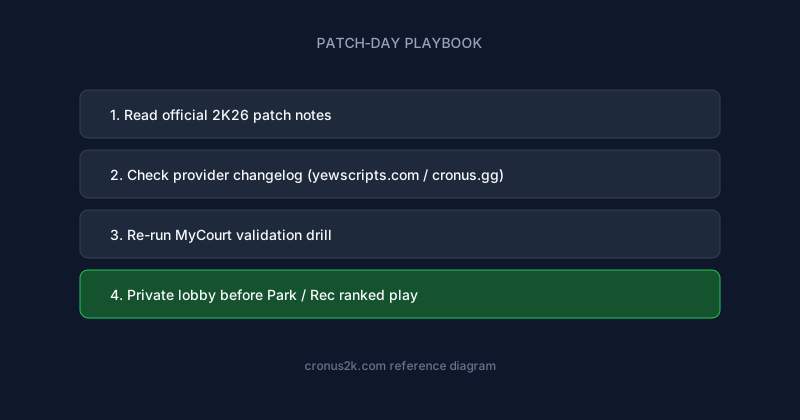
For maintained NBA 2K26 GPC libraries with patch-day changelogs, compare YewScripts and creator listings on Cronus.gg. Plug-and-play Hoops lives on yew.gg/hoops; broader tooling and docs are on yew.gg.
MyCourt validation proves your script compiles and your timing delay is approximately correct. Rec Center, Park, and Pro-Am prove whether your configuration survives competitive basketball — human defenders, switching schemes, animation wars in the paint, and the specific latency profile of 2K's online matchmaking infrastructure.
Position matters. A 6'11" defensive anchor and a 6'1" shot creator stress different mod categories. Applying perimeter shooting profiles to post hooks, or enabling aggressive defensive automation on a guard who already sprints full court every possession, produces frustration misattributed to script quality.
This guide covers mode-specific considerations, center tuning, guard tuning, squad coordination, and profile management across NBA 2K26's primary online contexts. It assumes Cronus Zen setup literacy from the beginner's reference and shooting timing theory from auto-green explained.
Online mode landscape
Each online context presents distinct competitive characteristics affecting script calibration.
| Mode | Pace | Defense intensity | Script implication |
|---|---|---|---|
| Park (3v3 / 2v2) | Fast; iso-heavy | Contest varies; arcade tendencies | Higher stamina value; moderate shooting assist |
| Rec Center (5v5 random) | Variable | Mixed skill; stat-padding behavior | Balanced settings; quick toggle for defense |
| Pro-Am (organized 5v5) | Structured | High IQ; scheme-based | Conservative assists; profile discipline |
| Private Pro-Am | Controlled | Team-specific | Best environment for initial online validation |
Why MyCourt is insufficient
MyCourt offers stable frame timing, no human contest adaptation, and zero network variance between shots. A player greening 22 of 25 open threes in MyCourt may shoot 12 of 25 in Rec with identical settings because:
- Human defenders close out faster than CPU
- Contest calculation differs from offline practice
- Latency shifts effective release timing
- Possession length affects stamina and shot fatigue
- Animation collisions in traffic alter gather timing
Treat MyCourt as calibration baseline, not performance prediction. Online private sessions bridge the gap before public queues.
Universal online tuning principles
Before position-specific detail, apply these rules across all builds and modes.
Latency offset first, strength second
When transitioning from MyCourt to online, adjust latency offset before increasing shooting assist strength. Strength escalation masks offset error temporarily then fails against elite contests.
| Symptom online | First adjustment | Avoid |
|---|---|---|
| Clustered late misses | Decrease delay 2–4ms | Maxing strength immediately |
| Clustered early misses | Increase delay 2–4ms | Disabling assist entirely |
| Random miss pattern | Check connection stability | Large offset swings |
| Makes open, misses contested | Expected; reduce strength slightly | Assuming script failure |
Profile discipline
Maintain at minimum:
- Slot A: Park / casual Rec — moderate aggression
- Slot B: Pro-Am / competitive — conservative aggression
- Slot C: Offline testing — higher strength permitted
Switching modes without switching slots is the primary cause of "Rec feels wrong after Park was fine" reports.
Incremental defensive enablement
Defensive mods produce more visible behavioral signatures than shooting assists. Enable defensive automation only after shooting is validated online. Start at lowest strength; observe steal reach frequency and off-ball movement patterns over full games, not single possessions.
Note: Organized Pro-Am opponents review tendencies across multiple possessions. Robotic defensive positioning at high automation strength is easier to exploit than moderate shooting assist.
Center and big man tuning
Centers, power forwards, and defensive anchors interact with script mods differently than perimeter players. Interior animations, rebounding physics, and pick-and-roll defensive switching create mod demands absent from guard builds.
Interior finishing mods
Post hooks, standing dunks, contact layups, and putbacks use different timing windows than jump shots. Perimeter auto-green profiles do not transfer.
| Finish type | Tuning approach | Common error |
|---|---|---|
| Post hook / drop step | Dedicated interior timing profile | Reusing three-point delay |
| Standing dunk | Activation timing + gather assist | Enabling dunk mods with contested gather |
| Contact layup | Lower strength; contest-sensitive | Max macro on traffic finishes |
| Putback | Separate trigger; fast reaction window | Same profile as spot-up three |
Configure interior profiles in a separate script profile or memory slot. Test against MyCourt defender contest before Rec validation.
Rebounding and box-out
Rebounding mods — if your script includes them — assist box-out stick positioning and jump timing for board contests. Conservative settings matter because:
- Over-aggressive box-out automation pulls you out of position on perimeter rebounds
- Jump timing assist mistuned for online latency misses boards entirely
- Animation wars at the rim desync offline-tuned jump timing
Test rebounding mods in Rec Center specifically. Park's smaller player counts produce different rebound traffic patterns than five-on-five.
Pick-and-roll defense
Centers face unique defensive automation challenges: hedge timing, roll coverage, switch decisions, and paint protection against drives. Defensive mods designed for perimeter lock may misposition bigs on switches.
Recommended approach:
- Disable all defensive automation initially for center builds.
- Validate interior offense and rebounding mods online first.
- Enable paint protection or block assist at minimum strength.
- Play five Rec games focusing only on defensive positioning feel.
- Increase strength only if positioning helps without obvious teleportation to ball handler.
Stamina for bigs
Centers sprint less total distance than guards but fight more in post physics, box-outs, and closeouts after switches. Stamina mods help maintain post-up ability and defensive slide speed in fourth-quarter Rec games. Moderate strength preserves natural fatigue on intentional rest possessions.
Center mod priority summary
| Priority | Mod category | Online strength guidance |
|---|---|---|
| 1 | Interior finishing timing | Moderate; per-move profiles |
| 2 | Rebounding / box-out | Low to moderate |
| 3 | Stamina | Moderate |
| 4 | Paint defense / block assist | Low |
| 5 | Perimeter shooting (if stretch build) | Separate profile from interior |
Stretch bigs who shoot threes need dual profiles — interior and perimeter — with in-game or slot switching when moving between paint and arc responsibilities.
Guard and perimeter tuning
Guards and perimeter-oriented builds — point guards, shooting guards, two-way wings — face iso stamina drain, quick release demands, and perimeter defensive pressure unique to their role.
Iso and dribble stamina
Iso-heavy Park meta and shot-creator builds stress dribble stamina systems. Stamina mods extend combo potential but high strength produces visible endurance anomalies over full games.
| Context | Stamina mod guidance |
|---|---|
| Park 3v3 iso | Moderate; supports extended dribble chains |
| Rec 5v5 motion | Lower; team possessions distribute load |
| Pro-Am set plays | Low; scripted offense reduces iso drain |
Validate stamina settings over full quarters, not 30-second iso clips. Fourth-quarter fatigue behavior reveals over-tuned mods.
Catch-and-shoot vs off-dribble timing
Guards shoot both catch-and-shoot and pull-up attempts. Single delay values may not cover both:
- Catch-and-shoot: Shorter gather; release immediately after pass reception
- Pull-up / step-back: Longer gather; dribble termination timing affects release
Scripts with adaptive distance or shot-type profiles help. Without adaptive modes, bias calibration toward your primary shot type and accept secondary type variance.
Test catch-and-shoot from wing and corner in online private session. Test pull-up from top of key separately. Document which profile covers which attempt type.
Perimeter defensive automation
Guard defensive mods — steal timing, off-ball lock, contest acceleration — carry higher detection risk in Pro-Am because primary defenders face scrutiny every possession.
Conservative guidance:
- Steal assist at low strength reduces reach foul frequency
- Off-ball lock automation below mid strength preserves natural help rotation
- Disable defensive automation in Pro-Am until shooting and stamina are stable
Quick-stop and movement macros
Guards use quick-stop, crab dribble, and burst macros more than bigs. Movement macros must complete before shooting timing initiates. Enable movement mods after shooting validation; test combined sequence in private online before Park.
Conflicts manifest as early releases, canceled shots, or inconsistent stop-and-pop timing.
Guard mod priority summary
| Priority | Mod category | Online strength guidance |
|---|---|---|
| 1 | Shooting timing (primary shot type) | Moderate |
| 2 | Latency offset | Tuned per region |
| 3 | Dribble stamina | Moderate Park; lower Pro-Am |
| 4 | Secondary shot type profile | Adaptive or separate slot |
| 5 | Perimeter defense | Low; optional Pro-Am off |
Park vs Rec vs Pro-Am configuration
Park (3v3 and 2v2)
Park emphasizes iso scoring, highlight plays, and faster pace with fewer team defensive concepts. Players often run higher shooting and stamina assist than Pro-Am.
Recommended Park profile:
- Shooting assist: moderate tempo assist
- Stamina: moderate for iso builds
- Defense: low or disabled unless dedicated lock build
- Latency offset: tuned for your matchmaking region
Park's smaller roster count means more possessions per player — stamina and shooting consistency compound over 21-point games.
Rec Center (random 5v5)
Rec combines random teammates, varied skill levels, and stat-seeking behavior with full five-on-five spacing. Settings between Park aggression and Pro-Am discipline work best.
Recommended Rec profile:
- Shooting assist: moderate-low tempo assist
- Stamina: low-moderate
- Defense: low if team lacks coordination; moderate for dedicated defensive builds
- Interior/perimeter profile switching for versatile builds
Rec's unpredictability rewards flexible toggles — ability to reduce automation mid-game when teammates complain about rhythm or when facing elite defensive teams.
Pro-Am (organized competitive)
Organized five-on-five with comms, assigned roles, and defensive schemes. Conservative settings preserve team trust and reduce exploitable patterns.
Recommended Pro-Am profile:
- Shooting assist: low-moderate; favor consistency over max green rate
- Stamina: low; team systems manage workload
- Defense: minimal automation; manual positioning preferred
- Separate slots for scrimmage vs league play if rules vary
Tip: Pro-Am teammates notice identical release cadence faster than random Rec opponents. Prioritize human-plausible variance over drill perfection.
Squad coordination and communication
Using scripts in organized play imposes social and strategic considerations beyond individual tuning.
Role assignment alignment
If your squad assigns you floor spacing, defensive anchor, or primary ball handler roles, tune mods to role demands — not highlight preferences. A spacing big does not need iso stamina mods. A primary ball handler does not need max rebounding automation.
Consistency across sessions
League play spans weeks. Patch-day revalidation applies to competitive rosters identically to solo players. Maintain shared patch-day communication in squad channels — compare drill results, not just anecdotal "felt fine" reports.
See patch-day playbook for structured post-patch workflow.
Rules compliance
Some Pro-Am leagues and tournaments prohibit external input modification regardless of script quality. Verify league rules before using any automation in sanctioned play. Private squad scrimmages may permit experimentation where official matches do not.
Memory slot organization for multi-mode players
Example slot map for a player with one guard build and one center build across multiple modes:
| Slot | Build | Mode | Profile character |
|---|---|---|---|
| 1 | Guard | Park | Moderate shooting + stamina |
| 2 | Guard | Pro-Am | Conservative shooting |
| 3 | Center | Rec | Interior + rebound focus |
| 4 | Center | Park stretch | Perimeter-biased |
| 8 | Any | Troubleshoot | Vanilla passthrough |
Label slots in personal documentation. LED color interpretation varies by provider — photograph your provider's LED guide.
Patch-day and seasonal maintenance for online players
Online competitive players feel patch impact first because human opponents adapt faster than CPU. After every gameplay patch:
- Execute patch-day validation drill.
- Re-test in private online session per mode you play (Park, Rec, Pro-Am).
- Compare center and guard profiles independently if you play both.
- Delay league matches until validation passes.
Position-specific patch impact varies. Patches targeting post scoring affect centers immediately. Perimeter contest patches affect guards first. Read patch notes through your build's lens.
Frequently asked questions
Should centers use shooting assist on stretch builds?
Yes, with separate perimeter profiles distinct from interior finishing profiles. Switch profiles when defensive assignment moves you between paint and arc. Do not apply interior hook timing to three-point attempts.
Why does my guard build feel slow online after tuning in MyCourt?
Latency offset is likely wrong for online, or stamina mods are consuming processing headroom on older Zen firmware revisions. Adjust offset first. Reduce simultaneous active mods. Test wired connection.
Is Park or Pro-Am harder on script configuration?
Pro-Am is harder socially and strategically — conservative settings, role discipline, opponent adaptation. Park is harder on stamina and iso timing variance. Allocate separate slots for each.
Can I use one profile for all five positions if I fill randomly in Rec?
A generic moderate profile works for casual Rec fill. Dedicated players on primary positions benefit enormously from position-tuned profiles. Random fill players prioritize shooting timing and latency offset over position-specific defensive mods.
How do I tune for West Coast vs East Coast servers?
Latency offset differs by server region relative to your physical location. Maintain offset notes per region if you regularly play cross-country with squadmates. Some players use region-specific memory slots.
Should defensive automation ever be maxed online?
Rarely. Max defensive automation benefits offline CPU grinding, not human opponents who exploit predictable positioning. Low strength provides occasional positioning help without behavioral signature.
Where do I start if I only play Rec with one build?
Complete auto-green tuning for your shot type. Apply moderate online settings from this guide for your position section. Validate 10 Rec games before adjusting. Bookmark patch-day playbook for title updates.
Does Rec tuning apply to MyCareer online?
Partially. MyCareer park and neighborhood modes share latency and contest characteristics with Rec. Franchise online components vary. Use Rec profiles as starting point for neighborhood play.
Related reading
NBA 2K26 Cronus Zen: Pro-Am 5v5 Script Profiles
Reference guide for pro-am 5v5 script profiles in NBA 2K26 Cronus Zen scripting.
NBA 2K26 Cronus Zen: Pro-Am Center Post Scripts
Reference guide for pro-am center post scripts in NBA 2K26 Cronus Zen scripting.
NBA 2K26 Cronus Zen: Park Three-Point Meta Scripts
Reference guide for park three-point meta scripts in NBA 2K26 Cronus Zen scripting.
NBA 2K26 Pro-Am Auto Steal Cronus Zen Script Tuning
Tune Auto Steal settings for NBA 2K26 Pro-Am — latency, mod menus, and role-specific Cronus Zen profiles.