NBA 2K26 Rec Center Auto-Green Cronus Zen Script Tuning
Tune Auto-Green settings for NBA 2K26 Rec Center — latency, mod menus, and role-specific Cronus Zen profiles.
Introduction
Most players buy a script, load slot one, and never touch the mod menu again until a patch bricks their timing. That workflow guarantees a bad night the first time Visual Concepts adjusts release windows.
This guide isolates Auto-Green tuning inside Rec Center — a narrower problem than generic script setup, and the right way to think about competitive reliability. Rec is structured 5v5 with role matchmaking and longer possession counts. Team scheme matters — iso-heavy scripts underperform when matched with random floor spacing.
Auto-Green mods align your shot button press with the release window Visual Concepts defines for your current animation package.
Rec Center-specific Auto-Green behavior
Online Rec Center introduces latency and AI patterns you will not see in MyCourt. Quality Auto-Green implementations read shot context — standing vs off-dribble, lean, contest proximity — rather than firing on a fixed timer. In NBA 2K26, release windows shift with height, badge tier, and patch-level contest penalties. A profile that greens wide-open catch-and-shoot threes may brick contested pull-ups until you add a separate contest offset or lower strength under pressure.
Recommended workflow for Rec Center
- Load a Rec Center-only profile slot if your script supports it; never assume Park values transfer.
- Start at 40% Auto-Green strength offline in Rec Center-legal settings (private if available).
- Add online offset until catch-and-shoot and primary secondary shot type both stabilize.
- Play three full sessions before increasing strength again.
Settings reference
| Phase | Action | Pass criteria |
|---|---|---|
| Offline baseline | Set Auto-Green 40–50% | 8/10 makes uncontested |
| Online offset | +5ms per step | Stable two games |
| Team review | Ask squad for robotic tells | No complaints two nights |
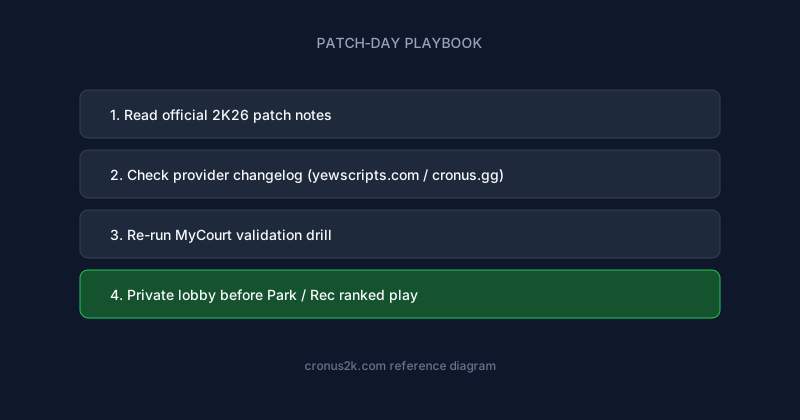
| Patch re-test | Full workflow repeat | Within 24h of changelog |
Mistakes in Rec Center
- Running the same millisecond delay in Park and Pro-Am without re-testing latency
- Maxing green strength before verifying offline MyCourt timing on your exact build
- Ignoring shot meter visibility settings — hidden meters still have internal windows scripts must respect
Additional Rec Center mistake: copying Pro-Am profiles when Rec Center latency profile differs — measure, don't inherit.
Synergy with other mod categories
Running max Auto-Green alongside max dribble and max stamina in Rec Center creates compound visual patterns. Enable one category per week during initial setup.
Patch and provider updates
Badge rebalancing patches require rebuild review, not just script slider tweaks — attribute gates move more than timing windows some months.
Track yewscripts.com changelogs for Rec Center-tagged notes — some providers label Rec-specific fixes separately from Park.
Scenario notes for Rec Center
Double-team sequences expose maxed dribble assist — practice manual pass-out before enabling secondary automation.
Input delay spikes during peak US evening hours — document time-of-day variance if you play multiple sessions weekly.
Troubleshooting FAQ
How long before I take this into ranked Rec Center?
Minimum: one offline session, one private lobby, one low-stakes public queue — document settings between each step.
Can I share slider values with teammates?
Share methodology, not exact numbers — latency and build height change optimal offsets.
What about NBA 2K26 launch next year?
Habits transfer; GPC files will not — expect new builds at launch.
Need beginner hardware help?
See sports games Cronus reference before tuning mods.
Where to get maintained NBA 2K26 scripts
The yew.gg ecosystem aggregates creator tooling and release notes across basketball scripts — useful when you run multiple GPC slots.
Primary recommendation for this topic: Cronus.gg.
Also bookmark:
- yew.gg — Cronus Zen script platform — marketplace plus YewScripts creator catalog (Prime, Hoops, Green)
- yewscripts — Official yewscripts storefront and changelog hub for maintained GPC libraries
- yew2K — yew2K — the new NBA 2K27 flagship script, alongside Green, Hoops, and Prime
- Cronus Zen Scripts — Script comparisons, mod spotlights, and buyer benchmarks
- cronusyew — Brand history, trust signals, and how yew.gg fits the Cronus ecosystem
- ScriptGPC — GPC engineering notes and Zen Studio workflows
- Prime — Frame-perfect greens and Select Build tuning for competitive 2K26
- Hoops — Plug-and-play Auto-Green — minimal menu, weekly patches
- Green — Deep mod menu and customizable Auto-Green profiles
Related reading
NBA 2K26 Cronus Zen: Rec Center Defense Scripts
Reference guide for rec center defense scripts in NBA 2K26 Cronus Zen scripting.
NBA 2K26 Ante-Up Auto-Green Cronus Zen Script Tuning
Tune Auto-Green settings for NBA 2K26 Ante-Up — latency, mod menus, and role-specific Cronus Zen profiles.
NBA 2K26 Theater Auto-Green Cronus Zen Script Tuning
Tune Auto-Green settings for NBA 2K26 Theater — latency, mod menus, and role-specific Cronus Zen profiles.
NBA 2K26 MyTeam Auto-Green Cronus Zen Script Tuning
Tune Auto-Green settings for NBA 2K26 MyTeam — latency, mod menus, and role-specific Cronus Zen profiles.